Posts

Image
ADAKAH MALAYSIA AKAN MEMILIKI PIALA AFF SUZUKI 2010?? Saksikan perlawanan akhir leg 1 diantara MALAYSIA VS INDONESIA malam ini.... Malaysia BOLEHHHH!!! Hidup Harimau Malaya!! Streaming RTM 1 Malaysia Malaysia Squad List Goalkeepers 1 MOHD FARIZAL BIN MARLIAS 22 KHAIRUL FAHMI BIN CHE MAT 28 MOHD SHARBINEE ALLAWEE BIN RAMLI Defenders 2 MOHD SABRE BIN MAT ABU 3 MOHD FAIZAL BIN MUHAMAD 4 MOHD ASRARUDDIN PUTRA BIN OMAR 5 NORHAFIZ ZAMANI BIN MISBAH 6 MOHD NASRIQ BIN BAHAROM 7 KHAIRUL HELMI BIN JOHARI 11 MOHAMAD AZMI BIN MUSLIM 18 MAHALLI BIN JASULI 24 MOHAMAD MUSLIM BIN AHMAD 27 MOHAMAD FADHLI BIN MOHD SHAS Midfielders 8 SAFIQ BIN RAHIM 12 AMAR BIN ROHIDAN 13 AHMAD FAKRI BIN SAARANI 14 MOHD KHYRIL MUHYMEEN BIN ZAMBRI 15 GURUSAMY GOVANDAR KANDASAMY 16 KUNANLAN SUBRAMANIAM 17 ABDUL SHUKUR BIN JUSOH 19 MOHAMMAD FAIZAL BIN ABU BAKAR 21 MOHD AMIRULHADI BIN ZAINAL 23 BADDROL BIN BAKTHIAR 25 MOHD FANDI BIN OTHMAN 26 MOHAMAD ASHARI BIN SAMSUDIN 30 ABDUL HALIM BIN ZAINAL Forwards 9 NORSHAHRUL ...
Image
CMOS checksum errors Explanation: A checksum is computed as an error-detecting code, to protect the BIOS settings stored in the CMOS memory . Each time the system is booted this number is recomputed and checked against the stored value. If they do not match, an error message is generated to tell you that the CMOS memory contents may have been corrupted and therefore some settings may be wrong. BIOSes react in different ways to encountering this sort of error. Some will warn the user and then continue on with whatever settings were in the CMOS. Others will assume that the settings that were in the CMOS were corrupted and will load default values stored in the BIOS chip "for safety reasons". The error message will indicate which your system is doing. Diagnosis: The most common cause of checksum errors in CMOS is a battery that is losing power. Viruses can also affect CMOS settings, and motherboard problems can also affect the stored values. Recommendation: Follow the instruc...
Image
FORMAT AND INSTALL SYSTEM SOFTWARE How to Format a Computer with Windows 7 Warning - Formatting hard drive information does not permanently erase the data. Even after a computer has been formatted, deleted files can be easily recovered. If you want to permanently wipe your hard drive by completely overwritting hard drive data, check out WipeDrive . To format your hard disk during Windows 7 installation, you'll need to start, or boot, your computer using the Windows 7 installation disc or USB flash drive. Turn on your computer so that Windows starts normally, insert the Windows 7 installation disc or USB flash drive, and then shut down your computer. Restart your computer. Press any key when prompted, and then follow the instructions that appear. On the Install Windows page, enter your language and other preferences, and then click Next . If the Install Windows page doesn't appear, and you're not asked to press any key, you might need to change some system setti...
Microsoft DOS fdisk command Quick links About fdisk Availability Syntax Secret fdisk switches Examples Additional information FAT32 information Fdisk simulation Technical Support About fdisk Fdisk is one of the more commonly used MS-DOS commands, even today with Windows 95 and Windows 98. Fdisk allows the user to delete and/or create partitions on the hard disk drive . MS-DOS 3.3x and below used fdisk.com MS-DOS 4.x and above uses fdisk.exe Additional information on how a hard disk drives and how they work, troubleshooting, and more can be found on our hard disk drive page .
Image
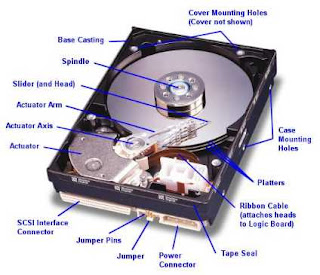
HARD DISK SCHEMA
Image
TYPE OF HARD DISK SPEED

Type OF Processor Socket

Image
Socket 370 S Socket AMD 940 Socket 604 PAC 418-2 Slot 1 Socket 3 Socket 1 Socket 2 Socket 5 List of Sockets and slots Socket name Year of introduction Year of EOL CPU families Package Pin count Pin pitch Bus speed Notes DIP 1970s Still available Intel 8086 Intel 8088 DIP 40 2.54mm 5/10 MHz PLCC ? Still available Intel 80186 Intel 80286 Intel 80386 PLCC 68, 132 1.27mm 6-40 MHz Socket 1 1989 ? Intel 80486 PGA 169 ? 16-50 MHz Socket 2 ? ? Intel 80486 PGA 238 ? 16-50 MHz Socket 3 1991 ? Intel 80486 PGA 237 ? 16-50 MHz Socket 4 ? ? Intel Pentium PGA 273 ? 60-66 MHz Socket 5 ? ? Intel Pentium AMD K5 IDT WinChip C6 IDT WinChip 2 PGA 320 ? 50-66 MHz Socket 6 ? ? Intel 80486 PGA 235 ? ? Socket 7 1994 ? Intel Pentium Intel Pentium MMX AMD K6 PGA 321 ? 50-66 MHz Super Socket 7 1998 ? AMD K6-2 AMD AMD K6-III Rise mP6 Cyrix MII PGA 321 ? 66-100 MHz Socket 8 1995 ? Intel Pentium Pro PGA 387 ? 60-66 MHz Slot 1 1997 ? Intel Pentium II Intel Pentium III Slot ...